
I Needed an Instrumental Track in 3 Weeks. AI Removed the Vocals in 60 Seconds.
AI vocal removal tools strip vocals from almost any song in under 60 seconds. The best options in 2026 are LALAL.AI, Moises.ai, and vocalremover.org — all with free tiers. Upload your track. Download the instrumental. Done. No audio engineering degree required.
You need an instrumental version of a song. It doesn’t exist anywhere. The wedding — or the video, or the project — is days away. That’s the exact problem I had to solve, and AI vocal removal tools solved it in under two minutes.
I tested six AI vocal removal tools, hit real problems, and found what actually works. This is the full breakdown — what failed, what delivered, and the exact steps that produced a clean instrumental in time for the ceremony.
Below: the manual method that flopped, the AI tools that actually delivered, and the step-by-step process for removing vocals from any song cleanly.
Why I Needed to Remove Vocals From a Song
The track was a licensed studio recording. No official instrumental version existed. Hiring a session musician to recreate it was too slow and too expensive. Reaching the original artist? Not realistic in three weeks.
The only option is to take the original file and separate the vocals from the music. That process — called stem separation — is exactly what AI vocal removal tools are built for.
I didn’t know that going in. I just typed “how to remove vocals from a song” into Google at 11 pm and started reading.
The Manual Method That Failed: Phase Cancellation
The first technique I found was phase cancellation. Old-school. No AI involved. The idea is simple: vocals in a stereo mix usually sit dead center. Invert one channel, merge it with the other, and the centered vocals cancel out — leaving only the sides, where the instruments live.
I spent two hours trying this in Audacity. The result? A hollow, warbling mess. Distant guitar. A faint ghost of the vocals still drifting somewhere in the middle. The bass line had essentially disappeared.
Phase cancellation works only under very specific conditions — usually older recordings with simple, clean mixes. Anything produced in the last 20 years falls apart fast. Modern production spreads instruments across the full stereo field in ways that make manual channel manipulation nearly useless.
I needed a different approach. That’s when I found AI vocal removers.
How AI Tools Remove Vocals From a Song
AI vocal removal tools use a technique called source separation — deep learning models trained on thousands of isolated stems — vocals, drums, bass, guitar — each pulled apart from professionally mixed tracks.
Where phase cancellation relies on a simple acoustic trick, AI source separation actually learns what a human voice sounds like and subtracts it from the full mix. The result is far cleaner. The model identifies the frequency patterns, timing, and tonal qualities of the vocals, then outputs two files: a vocal track and an instrumental.
Most tools process a 3-minute song in under 60 seconds. No experience needed. Upload, wait, download.
Best Tools to Remove Vocals From a Song (Tested)
I tested six tools over two evenings. Here’s how they stacked up:
| Tool | Best For | Free Tier | Ease of Use |
|---|---|---|---|
| LALAL.AI | Pro-quality separation, complex mixes | Preview only (no download) |  |
| Moises.ai | Musicians, full stem control, mobile use | Limited uploads per month | |
| vocalremover.org | Fast, no-signup removal | Fully free | |
| Splitter.ai | Simple 2-stem splits | Free with limits | |
| Media.io | All-in-one creative suite | Free with watermark | |
| X-Minus.pro | Popular and mainstream songs | Free with limits | |
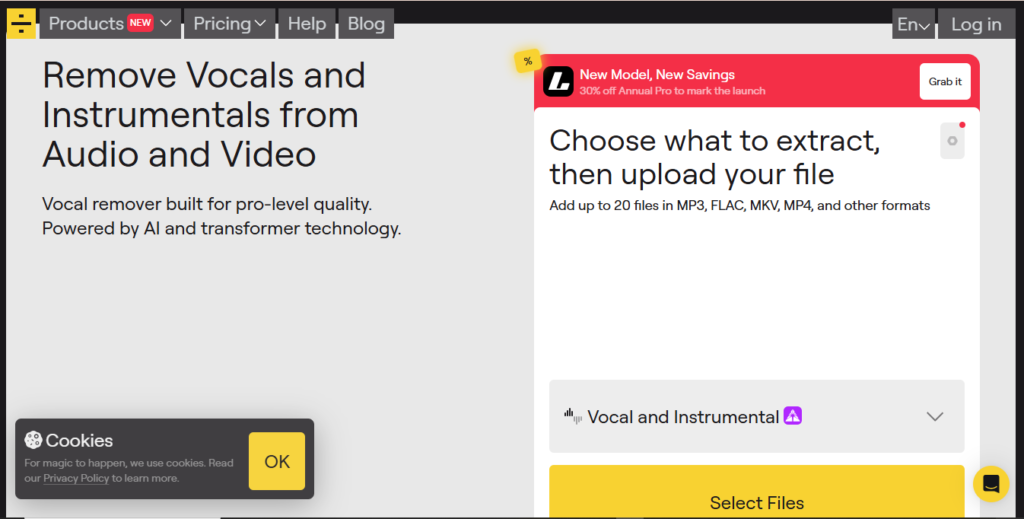
My top pick: LALAL.AI. Its sixth-generation Andromeda model produced the cleanest instrumental of any tool I tested. The vocals were gone. The instrumentation — including a delicate piano line that defined the song — stayed completely intact. Moises.ai was a close second, especially if you want a mobile app. vocalremover.org genuinely impressed me as a fully free tool: no account, no wait, results in about 10 seconds.
Step-by-Step: How I Removed Vocals From the Track
Here’s the exact process I followed.
Step 1: Find a High-Quality Source File
Don’t start with a YouTube rip or a compressed MP3. The audio quality going in determines the audio quality coming out. I sourced a 320kbps MP3 directly from a music purchase platform. If you can get a FLAC or WAV file, use it. LALAL.AI supports MP3, WAV, FLAC, AAC, M4A, and most common video formats.
Step 2: Upload to an AI Vocal Remover
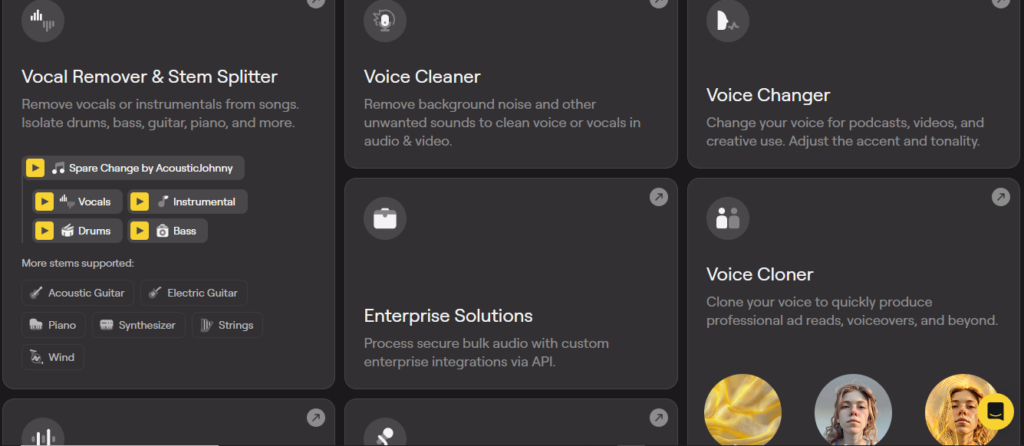
Go to LALAL.AI (or your chosen tool), select “Vocal and Instrumental” as your separation type, and upload your file. LALAL.AI processes the track and generates a preview of both stems — enough of the first minute to judge quality before you commit to downloading.
Step 3: Test on Multiple Devices
Before downloading the full file, listen to the preview on laptop speakers, your phone, and a pair of headphones. What sounds clean on headphones can reveal artifacts—thin, metallic echoes where the vocals used to be—when played through speakers. Check all three.
Step 4: Test on the Real Sound System
This was the step I almost skipped. I drove to the wedding venue two weeks out and asked the sound technician to run the track through the PA. At that volume, through those speakers, any remaining artifacts would be obvious. The LALAL.AI output passed. One of the other tools I’d tested didn’t — a faint vocal ghost surfaced at the chorus that I’d completely missed on headphones.
Step 5: Download and Back Up the File
Once I confirmed the quality, I clicked “Split in Full” on LALAL.AI and downloaded the instrumental. I saved copies in three places: my laptop, an external drive, and cloud storage. File loss two days before a wedding is not a risk worth taking.
Step 6: Keep the Original as a Fallback
I kept the original vocal version on a USB drive and handed it to the DJ with one instruction: play the instrumental, but if anything goes wrong, the original is ready. It didn’t come to that. But having a backup cost me nothing.
Common Problems When You Remove Vocals From a Song
A few issues came up during testing. Expect these.
Vocal bleed. Some tools leave a faint trace of vocals, especially at chorus peaks where the voice is heavily layered. LALAL.AI’s de-echo feature cleaned this up significantly.
Bass loss. Phase cancellation almost always damages the low end. AI tools handle this better, but some still thin out the bass. Compare the bass weight of the processed file against the original before you commit.
Reverb tails. If the vocalist’s reverb bleeds into the instrumental frequencies, the AI may leave artifacts behind even after removing the dry vocal. LALAL.AI’s Echo & Reverb Remover handles this as a separate step.
Low-quality source files. AI can only work with what it’s given. A 128kbps MP3 won’t produce a clean stem. Get the best-quality file you can find before you upload anything.
The Wedding Day Result
The song played
at 6:47 pm. Clean piano. Full strings. No vocals. My sister cried. My brother-in-law cried. I stood in the back trying to look calm, quietly relieved the file hadn’t corrupted overnight.
The whole process — finding the right tool, testing outputs, preparing backups — took about four hours across two evenings. Most of that was comparison testing. The actual AI processing took under two minutes.
If I started over today knowing what I know now? Forty-five minutes, start to finish.
Your Turn: Pick a Tool and Upload Your Track
Start with vocalremover.org if you need something fast, free, and hassle-free. Use LALAL.AI if you need the cleanest possible result — especially for complex modern productions. Try Moises.ai if you want a mobile app with a broader music toolkit.
Whichever tool you pick, follow the steps above. Start with a high-quality source file. Test on real speakers. Keep your backups. And if the stakes are high, always have the original ready.
You don’t need a studio. You don’t need an audio engineer. You need a browser and the right tool.
Frequently Asked Questions
Are there free tools to remove vocals from a song without losing quality?
Yes. vocalremover.org is fully free — no sign-up, no limits, results in about 10 seconds. LALAL.AI and Moises.ai both offer free tiers, though LALAL.AI requires a paid plan to download the full processed file. For one-off use, vocalremover.org is hard to beat. For professional-quality output on complex tracks, LALAL.AI’s paid tier produces noticeably cleaner results.
Will the instrumental file work with any DJ software or sound system?
Yes. AI vocal removers output standard audio files — MP3, WAV, or FLAC — compatible with all DJ software, DAWs, and PA systems. LALAL.AI lets you choose your output format before downloading. WAV is the safest choice for live playback: no compression artifacts.
Can AI tools remove bass or reverb as well as vocals?
Most AI vocal removers focus on separating vocals from instrumentals. LALAL.AI also offers dedicated Bass stem separation and a standalone Echo & Reverb Remover for cleaning up residual reverb. Moises.ai supports full multi-stem separation — drums, bass, piano, and vocals as individual files.
What’s the difference between AI vocal removal and phase cancellation?
Phase cancellation is a manual technique that inverts one stereo channel to center-panned audio. It works on some older recordings but frequently damages bass frequencies and leaves artifacts in any modern, densely mixed track. AI source separation uses trained neural networks to identify and extract vocal frequencies with far greater precision. For anything produced in the last 20 years, AI tools consistently win.
How long does AI vocal removal actually take?
Most tools process a 3- to 4-minute song in under 60 seconds. vocalremover.org typically finishes in about 10 seconds. LALAL.AI’s speed depends on the selected mode — Fast mode is near-instant for paid subscribers, while Relaxed mode may take a little longer during peak times. Either way, you’re looking at seconds to minutes, not hours.
Can I remove vocals from a song for free without downloading software?
Yes. Tools like vocalremover.org and X-Minus.pro run entirely in your browser — no download, no installation, no account required. Upload your track, wait a few seconds, and download the instrumental straight from the page. LALAL.AI and Moises.ai also work in-browser, though their free tiers limit how much you can download without a paid plan. For a quick, one-time vocal removal with zero software involved, vocalremover.org is the fastest option available.
What is the best free tool to remove vocals from a song?
vocalremover.org — no account, no limits, results in 10 seconds. For cleaner output on complex tracks, LALAL.AI and Moises.ai offer free tiers, though LALAL.AI requires a paid plan to download the full file.
Quick picks:
-
- vocalremover.org — 100% free, fastest
-
- LALAL.AI — best quality, free preview only
-
- Moises.ai — best mobile app, limited free uploads
-
- Splitter.ai / Media.io / X-Minus.pro — solid alternatives, free with limits
Can you remove vocals from any song?
Yes — but quality varies. Three things matter most:
-
- Source file: FLAC or 320kbps MP3 beats a compressed rip every time
-
- Mix complexity: Dense, reverb-heavy tracks are harder to separate
-
- Tool choice: LALAL.AI handles complex mixes better than most free options
Start with the best-quality file you can find.
Does removing vocals also remove the bass or reverb?
Not with a good AI tool. Watch for:
-
- Bass loss: More common with phase cancellation. AI tools handle it better, but always compare against the original.
-
- Reverb tails: LALAL.AI’s Echo & Reverb Remover cleans these up separately.
-
- Vocal bleed: Use LALAL.AI’s de-echo feature to reduce faint leftover vocals.
What’s the difference between AI vocal removal and phase cancellation in Audacity?
Phase cancellation inverts one stereo channel, resulting in center-panned vocals. It works on a narrow range of older, simple recordings. On modern tracks, it thins out the bass and leaves vocal ghosts.
AI source separation uses deep learning to identify and subtract the vocal from the full mix. Instruments stay intact—no audio experience needed. Use AI tools for anything you actually need to sound good.
Is AI vocal removal better than manual phase cancellation?
Yes. Significantly better on modern recordings. AI learns what a voice sounds like and subtracts it with precision. Phase cancellation inverts channels and hopes.
How long does it take to remove vocals using AI?
Under 60 seconds. Usually under 10.
-
- vocalremover.org: ~10 seconds
-
- LALAL.AI Fast mode: near-instant (paid)
-
- Moises.ai: under a minute
The full process — file sourcing, uploading, testing, backing up — takes about 45 minutes start to finish.
Will the instrumental file work with any DJ software or sound system?
Yes. AI tools output standard MP3, WAV, or FLAC files compatible with all DJ software and PA systems. Use WAV for live playback—no compression artifacts. Always test on the actual sound system before the event.
Can I remove vocals for free without downloading software?
Yes. These tools run in your browser:
-
- vocalremover.org — free, no sign-up, ~10 seconds
-
- X-Minus.pro — free with limits
-
- LALAL.AI — free preview; paid to download full file
-
- Moises.ai — web app + iOS/Android apps
What are the most common problems — and how do I fix them?
| Problem | Fix |
|---|---|
| Vocal bleed | Use LALAL.AI’s de-echo feature |
| Bass loss | Switch to LALAL.AI: compare against the original |
| Reverb tails | Run LALAL.AI’s Echo & Reverb Remover |
| Poor quality output | Use a high-quality source file (FLAC or 320kbps MP3) |
The most common mistake: uploading a low-quality file. Fix the source first.




wwnhyfdxyxtnezjhvfexnrfxvqhzhu
Pingback: I Fed Claude AI My 340-Page Textbook at 2 AM. Here’s What Happened. -
Pingback: I Made an AI Cover of a Dead Singer — And I Still Can’t Decide If I Did Something Wrong - AI Khyber